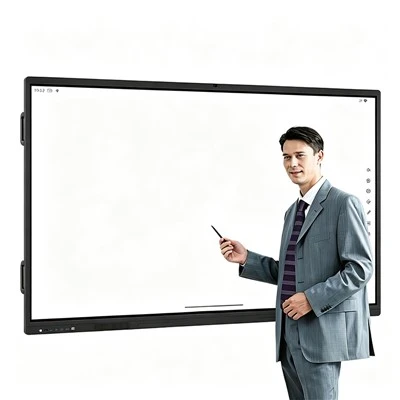


If you’ve ever sat through a presentation where the presenter fumbles with a stuck projector, squints at a grainy slide, or waits minutes for a video to load, you know how quickly engagement can die. For years, conference rooms relied on projectors and whiteboards, but a shift is underway—and as a supplier of interactive display panels, I’ve seen firsthand how these tools aren’t just a “nice-to-have” anymore, but a game-changer for how teams connect, communicate, and collaborate. The question isn’t whether interactive display panels are good for presentations—it’s how every organization that hosts meetings, trains staff, or shares ideas can benefit from them.
Let’s start with the basics. Traditional presentation tools have fundamental flaws. Projectors often suffer from low resolution, glare in bright rooms, and setup delays that eat into valuable time. Whiteboards, while tactile, are static—you can’t save your notes, zoom in on a data set, or pull up a supplementary video without erasing what you already wrote. Interactive display panels solve these problems by combining the visual clarity of a monitor with the interactivity of a touchscreen, creating a dynamic tool that adapts to a presenter’s needs.
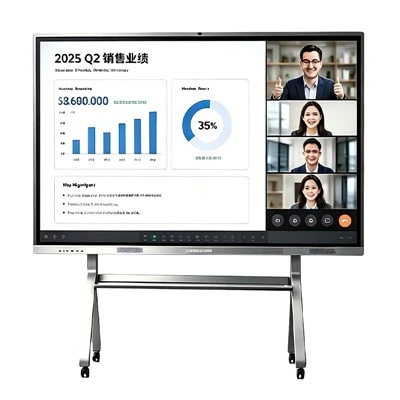
One of the biggest advantages is engagement. Studies on presentation effectiveness consistently link interactivity to higher audience participation, and interactive display panels take that to the next level. Take a sales presentation, for example. Instead of showing a static bar graph on a projector, a presenter can pull up real-time sales data directly on an interactive display panel, zoom into a regional breakdown, and even let a team member tap the screen to highlight a underperforming territory. This isn’t just passive viewing—it’s hands-on learning, which helps audiences retain information better. A 2022 report from the University of Southern California’s Annenberg School for Communication found that interactive elements in presentations increased audience retention by 32% compared to static slides. That kind of impact matters for everything from client pitches to employee training.
Another key benefit is versatility. Modern interactive display panels aren’t one-trick ponies. They support everything from touch input to wireless screen sharing, so presenters can seamlessly switch between sharing their laptop, a tablet, or even a live stream. If you’re in a conference room with remote team members, many panels integrate with video conferencing tools like Zoom or Microsoft Teams, letting remote participants draw on the screen, annotate slides, and contribute just as easily as people in the room. This is where products like the Conference Flat Panel shine—it’s designed specifically for meeting spaces, with features like built-in speakers and noise-canceling microphones that eliminate the need for extra equipment. No more scrambling to connect a separate webcam or speaker; everything you need is built in, which cuts down on setup time and technical headaches.
Let’s talk about accessibility, too. Presenters often forget that not all audience members process information the same way. Static slides with small text can be hard to read for people with visual impairments, and video content without captions excludes those with hearing loss. Interactive display panels let presenters adjust text size on the fly, add real-time captions to videos, and even pull up high-contrast mode for better visibility in bright rooms. This level of customization ensures that presentations are inclusive for everyone, a critical consideration for workplaces that value diversity and accessibility. For example, a Flat Panel Touch Screen lets presenters navigate menus and adjust settings with a simple tap, so even someone new to the technology can adapt quickly without feeling overwhelmed.
Of course, some people still have questions. Is interactive display panels too expensive? Do they require special training? Let’s address those concerns. While the initial cost is higher than a basic projector, interactive display panels save money in the long run. You won’t need to replace projectors every few years, or buy extra whiteboard supplies, and you can eliminate the need for separate tools like document cameras or wireless presentation systems. For small businesses, there are entry-level models that offer core interactive features without a huge upfront investment. As for training, most modern panels are designed to be user-friendly. Many include quick-start guides, built-in tutorials, and intuitive touch interfaces that work like a smartphone—you don’t need a IT degree to use them. In fact, many presenters pick up the basics in 10 minutes or less.
Another point to consider is content management. With traditional tools, presentations are often tied to a single laptop or a USB drive. If a presenter forgets their laptop, they can’t access their slides. Interactive display panels let you store presentations directly on the device, or access them from cloud storage like Google Drive or OneDrive. That means a presenter can walk into a room, log into their account, and pull up their entire deck in seconds. For training teams, this is a huge time-saver—they can pre-load modules for employee onboarding, update content in real time, and track who has accessed the material. The 4k Interactive Panel, for example, delivers crisp, detailed visuals that make even dense training materials easy to follow, so new hires can absorb information faster.
I’ve seen this play out with my own clients. A marketing agency I work with recently switched from projectors to interactive display panels for their client pitches. Before, they’d spend 10 minutes each session setting up the projector, adjusting the focus, and fumbling with slides. Now, they walk into the conference room, tap the screen to pull up their latest campaign visuals, and let clients interact with the data themselves. The agency reported that client feedback improved dramatically, with more follow-up meetings and signed contracts. Another client, a manufacturing company, uses interactive panels for safety training. Instead of showing long, boring videos, trainers use the touchscreen to pause videos, highlight hazard zones, and let employees quiz each other on safety procedures. Turnover in their training program dropped by 18% in the first six months after the switch.
Critics might argue that interactive display panels can be distracting—presenters might get carried away with tapping and swiping instead of engaging with the audience. But here’s the thing: any tool can be used poorly. The same way a bad presenter can ruin a great whiteboard session, a presenter with a lackluster interactive panel presentation will fall flat. The key is to use the tool as a supplement, not a replacement, for strong storytelling. Interactive panels are there to enhance your message, not overshadow it. For example, you wouldn’t use a touchscreen to toggle through every bullet point of a speech; instead, use it to highlight key data, show a short video, or let the audience weigh in on a question. When used intentionally, interactivity keeps the audience focused, not distracted.
What about hybrid presentations, which are now a staple in many workplaces? Interactive display panels bridge the gap between in-person and remote attendees, something projectors and whiteboards can’t do. With a Touch Interactive Flat Panel Display, you can have remote participants annotating slides in real time, so they feel like they’re part of the conversation instead of just watching from a screen. I work with a tech startup that hosts weekly team meetings with remote workers across three time zones. Before using interactive panels, remote team members often felt left out—they couldn’t see what was being written on the whiteboard, or contribute to brainstorming. Now, with an interactive display panel, remote workers can draw ideas directly on the screen, and the in-person team can see it clearly. The startup says collaboration has improved so much that they’re no longer considering a return to only in-office meetings.
Let’s also think about the future. As workplaces become more digital, interactive display panels will only become more essential. Features like AI-powered note-taking, automatic translation, and integration with other office tools are already in development, and these tools will make presentations even more seamless. But even today, the benefits are clear: better engagement, greater accessibility, easier collaboration, and time saved on setup.
If you’re still on the fence, think about this: a presentation’s success depends on how well it connects the presenter and the audience. Tools that create two-way communication, that let people participate, that adapt to different needs—those are the tools that work. Interactive display panels aren’t just a new technology; they’re a way to make presentations more effective, more inclusive, and more memorable.


Ready to see what interactive display panels can do for your team? We’re here to help you find the right solution for your conference room, training space, or presentation needs. Whether you’re looking for a compact touch screen for a small meeting room or a large 4k panel for a conference hall, we can guide you through the options. Get in touch to discuss your requirements and find the perfect interactive display tool that fits your budget and space.
References:
- University of Southern California Annenberg School for Communication. (2022). The Impact of Interactivity on Audience Retention in Presentations.
- Global Workspace Association. (2023). Conference Room Technology Trends: A Guide for Modern Workplaces.
- Accessibility in the Workplace Journal. (2022). Inclusive Presentation Tools: Designing for Diverse Audiences.
- Interactive Display Industry Report. (2023). ROI of Interactive Display Panels for Business Communication.